After I started to ramp up on agentic coding, I found my workflow lagging behind how I ended up working. Previously I would clone my project's repo twice and switch back and forth between the clones. I used stack-based git workflow git-pile, which eliminated the overhead of switching branches and stashing changes.
When I was occasionally in the middle of something and needed to context switch and have a clean repo, I would have the other clone and that was about as much as I could handle at a time. I knew of git worktrees but never needed it so didn't bother upgrading my workflow.
In the age of AI I found myself needing a lot more. Understanding various parts
of the codebase is one prompt away and making changes requires a much smaller
context switch than before so I do it much more frequently. However, the two
clones weren't really sufficient for this anymore, as it became more painful to
sync changes back and forth before they landed on main.
So I had Claude design me a new workflow that scaled better and allowed more parallelization. I wanted:
- one repo with
nworktrees with no prior set up required - tmux integration so each worktree gets its own tmux window
- no dangling worktrees and branches if I abandon work
- compatibility with git-pile, but no direct integration
- packaged in an easy to use CLI with powerful commands that capture a lot of complexity
I wanted to use worktrees under the hood, but also have that be an implementation detail as I'd prefer to not deal with them directly.
The end result is a Python script I called agents that has 6 commands:
new [name]- create a new worktreelist- lists all existing tasks/worktreesmerge- merge the current changes into the parent repo onmainrm- delete this worktree and close its tmux windowopen- create a tmux window with the specified worktree (in case it was closed)clean- delete all stale worktrees and branches, and closes their tmux windows
This provides a very simple workflow:
1 2 3 4 5 6 7 8 9 10 11 12 13 14 15 16 17 18 19 | |
The main branch on my repo clone now has this commit, and I can use git-pile
to submit a pull request with this change. This workflow works in any git repo
out of the box, no special setup required.
While Codex is running, I can switch back to the previous tmux window and start
another agent, or I can even branch off that particular worktree into a new one.
I'm not sure I want that from the workflow since I prefer working on the repo's
main branch in the first place, so time will tell if I end up using that
branching behavior.
Ideally these worktrees are shortlived and will just get their work merged in.
However, there are situations where there's longer running work or work I end up
not moving forward with, and for that I had Claude implement an agents clean
command. It deletes all stale worktrees, with some protections for unmerged work
to avoid losing uncommitted changes.
To understand what work is in progress, agents list gives a nicely-formatted
output that's piped to fzf for easy selection:
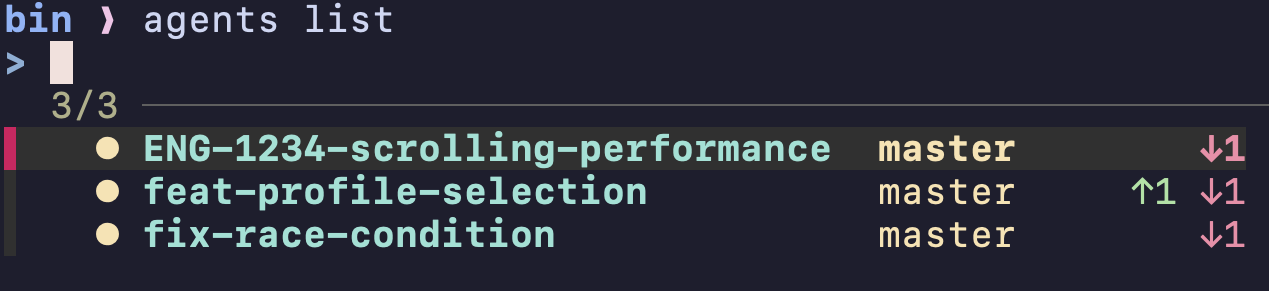
The arrows indicate commit status, which is helpful to understand if any worktrees may need rebasing.
After building and working this tool a bit I realized the workflow works even
when not using an agentic programming workflow, so agents is probably not the
best name, but since I developed it with that use case in mind I'll probably
continue to use that for now.
The full script is in my dotfiles' ./bin folder, which is automatically
accessible anywhere from my Terminal. I've also written a Claude/Codex skill to
run this automatically for me in case I forget to do so myself, and I'll
probably keep tweaking the workflow to my liking as I work with it more.